What makes a touchscreen media head unit responsive enough for daily use?




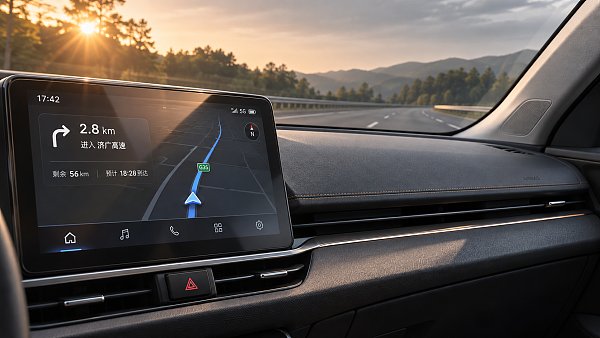
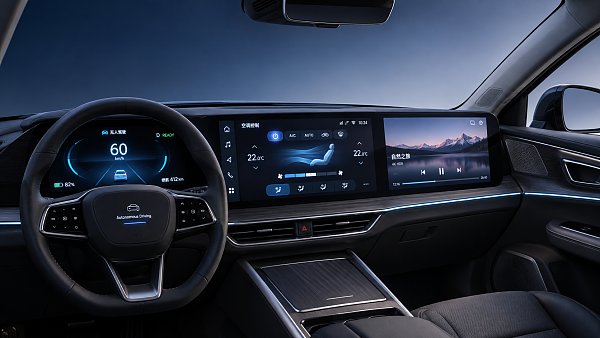
A responsive touchscreen media head unit is one that disappears into the driving routine: it wakes promptly, accepts a tap without hesitation, keeps maps and music stable, and reconnects to a phone without turning every trip into a troubleshooting session. For most drivers, “responsive enough” does not mean flagship-phone speed. It means predictable performance under the tasks a car demands every day, including cold starts, navigation, Bluetooth calls, reversing-camera use, music streaming, and wired or wireless smartphone projection.
That distinction matters when comparing units. A large display, a high advertised processor speed, or a polished demo screen can all look convincing. Yet daily satisfaction is usually decided by the interaction between hardware, software, storage, touch tuning, and vehicle integration. A unit that launches one benchmark quickly but lags when switching from navigation to audio is not responsive in the way drivers actually need.
Start with the moments that expose lag
Most owners notice a slow head unit in a small number of repeated situations. The screen may take too long to wake after the ignition is turned on. A tap may register visually but open the requested function a second later. Navigation can stutter while a streaming app is running. Wireless phone projection may connect slowly or drop after a short stop. These are more meaningful tests than simply scrolling through a settings page.
For daily driving, a practical expectation is that common controls should respond with no obvious pause: volume, climate-related shortcuts where supported, media skipping, camera switching, home-screen navigation, and call acceptance. Map loading and a first phone connection can take longer, especially after a full shutdown, but the driver should not need to repeat touches or wait through several uncertain screens.
Responsiveness also needs to remain consistent. A unit that feels fast immediately after installation but becomes sluggish after weeks of use may have limited free storage, weak thermal management, unstable software, or too many background services. The best choice is rarely the one that performs most dramatically for the first five minutes; it is the one that behaves calmly after a long commute, multiple phone connections, and repeated sleep-wake cycles.
Processor and memory set the ceiling, but software determines much of the experience
The processor matters because the head unit is often doing several jobs at once. It may be rendering maps, decoding audio, maintaining Bluetooth and Wi-Fi connections, reading vehicle data, and managing the touchscreen interface. Underpowered hardware can make every task compete for attention, especially when navigation or wireless projection is active.
However, processor specifications alone are a weak buying shortcut. Two units with similar chip families can feel very different because their operating systems, graphics drivers, storage quality, screen resolution, and installed applications are different. A heavily customized interface with animated widgets and preloaded apps can waste resources that would be better reserved for navigation and connectivity.
Memory capacity deserves equal attention. Random-access memory affects how well the unit holds active apps and services without reloading them. Limited memory often reveals itself when the system drops a music app after opening navigation, pauses during a phone call, or rebuilds the interface after switching views. More memory does not guarantee good software, but a unit intended to run navigation, media apps, and wireless smartphone projection should not be configured so tightly that normal multitasking becomes a compromise.
Storage is another overlooked factor. Internal storage is used for system updates, map data, app caches, downloaded music, and temporary files. When it is nearly full, startup and app behavior can deteriorate. Buyers who expect to install several apps or store offline maps should check usable storage rather than relying on the headline figure. Some of the advertised capacity is normally reserved for the operating system and recovery functions.
Touch response is more than the panel itself
A bright, high-resolution display does not automatically produce a good touch experience. The digitizer, touch-controller tuning, screen mounting, and software input handling all affect whether the interface feels direct. In a moving vehicle, slight delay becomes more distracting than it would on a desk-mounted tablet because the driver must divide attention between the road and the screen.
Useful signs of a well-tuned interface include accurate taps near the screen edges, smooth pinch-and-zoom behavior in maps, and reliable recognition when a finger approaches at an angle. The screen should not require excessive pressure, and it should not trigger actions from accidental brushes. A responsive unit also gives clear feedback immediately, even if a larger operation needs a moment to complete. A highlighted button, a loading state, or a prompt transition helps the driver understand that the command was received.
Physical conditions matter here. Capacitive touchscreens can be less cooperative with gloves, wet fingers, or a wet screen. A vehicle used in very cold or very hot climates may also expose weaknesses that are invisible in an indoor demonstration. If possible, assess the unit in a parked vehicle with the engine running and with typical cabin lighting, rather than judging only from showroom video footage.
Phone connectivity is often the real performance test
Many drivers now use the head unit primarily as a display and control point for a smartphone. That makes Android Auto, Apple CarPlay, Bluetooth, Wi-Fi, USB hardware, and software compatibility central to perceived speed. A head unit can have a capable interface of its own yet still feel poor if the phone connection is slow, unreliable, or burdened by weak wireless hardware.
Wired projection is usually the simpler path for drivers who prioritize stability. It removes one wireless link from the chain and can keep the phone charged during navigation. The quality of the USB port, cable, and installation still matters. Loose connectors, low-quality extension cables, or poorly positioned ports can cause intermittent disconnects that look like a software fault.
Wireless projection is convenient, particularly for short trips, but it asks more of both the phone and the head unit. Connection time, Wi-Fi performance, interference in the vehicle, and background phone behavior can all affect the result. Buyers should look beyond the phrase “wireless CarPlay” or “wireless Android Auto” and ask how the unit behaves after a brief fuel stop, after the phone has been paired with several devices, and when navigation and music are running together.
Compatibility is also broader than the connection standard. A responsive daily-use system should handle calls, microphone input, steering-wheel buttons, voice control, and audio handoff without confusing delays. A low-price unit may technically support these functions but implement them unevenly. For example, audio may resume slowly after a call, voice assistants may wake inconsistently, or steering-wheel controls may require a separate adapter with limited functionality.
Startup behavior matters more than a single boot-time claim
Head units commonly use sleep modes so the system can resume quickly after the vehicle is parked for a short period. This can make a unit feel nearly instant on ordinary errands. It is useful, but it should not be mistaken for true cold-start performance. After a longer parking period, battery-protection event, software update, or power interruption, the unit may need a full boot.
When evaluating a system, separate these two experiences:
- Resume from sleep: Can the screen, camera, audio, and phone connection become usable promptly after starting the vehicle?
- Full restart: Does the unit reach a stable home screen without freezing, repeated logo screens, or delayed audio and camera functions?
A fast resume is valuable, but a reliable full boot is more important for ownership over time. Poor power management can also create hidden trade-offs. Keeping a system awake for too long may increase standby battery draw, while an aggressive shutdown policy may force repeated cold boots. The preferable setup matches the vehicle’s electrical behavior and gives the user sensible control over sleep duration where that option is offered.
Do not overlook heat, installation quality, and vehicle integration
In-dash electronics operate in a harsher environment than home tablets. Summer sun, enclosed dashboards, vibration, and restricted airflow can all affect performance. Heat can cause a processor to reduce speed, leading to slower navigation redraws, audio interruptions, or delayed touch response. It can also shorten the useful life of lower-grade components.
There is no need for consumers to diagnose internal thermal design from a specification sheet, but a few signals are helpful. Be cautious of units that become noticeably hot during ordinary map use, units with many reports of random restarts, or products that make sweeping performance claims while offering little information about supported vehicle fitment and software updates. A properly fitted fascia, secure mounting, correct wiring harness, and stable power connection all contribute to reliable operation.
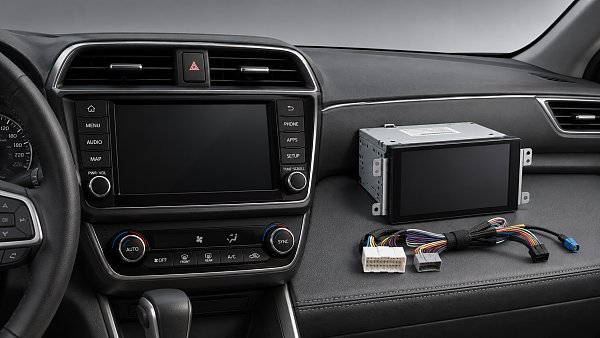
Vehicle integration can be the difference between a smooth upgrade and a frustrating one. Retaining factory cameras, parking sensors, steering-wheel controls, amplifier functions, and warning chimes may require a compatible interface module. If these parts are mismatched, the head unit may appear slow because features wake late, inputs are interpreted incorrectly, or the system repeatedly tries to reconnect to a vehicle network.
How to evaluate a unit before committing
A short hands-on check should focus on a repeatable routine rather than a seller’s preferred demo. Start the vehicle, connect the phone in the way you expect to use it, open navigation, begin music playback, make or simulate a call, switch to the reverse-camera view if applicable, then return to the map. Repeat the sequence after the unit has been running for a while. This reveals far more than screen size or menu design.
For online purchases, look for information that supports ownership rather than only installation: the operating-system version, update method, usable storage, compatibility with the exact vehicle and trim, support for wired or wireless phone projection, included harnesses and interfaces, warranty terms, and the process for addressing software faults. Vague hardware claims paired with little fitment detail are a warning sign, especially when factory features need to be retained.
It is also sensible to match the unit to the driver’s real workload. A commuter who mainly streams audio and uses phone projection may value stable reconnection and clean physical controls over a feature-heavy standalone interface. A driver who travels in areas with weak mobile coverage may care more about offline maps and sufficient storage. Someone replacing a factory system in a vehicle with cameras, amplifiers, and steering-wheel controls should place integration ahead of headline processor claims.
For everyday use, the right touchscreen media head unit is rarely the one with the longest feature list. It is the one that responds correctly under ordinary pressure, stays stable when several functions are active, and continues to behave that way after the novelty of installation has passed.
Have questions about this sector analysis, or seeking best practices specific to your niche? Drop us a line below and let the senior consultants at GAC assist you.
“We respect your privacy. Your information is strictly confidential.”
Related News
- 00
0000-00
How to assess a smart cockpit electronics manufacturer's integration capability - 00
0000-00
How does a shielded HSD cable reduce interference in vehicles? - 00
0000-00
What drives demand for scroll compressors in the automotive market? - 00
0000-00
Does AEC-Q200 apply to flexible printed circuits? - 00
0000-00
How does production volume affect automotive flexible electronics costs?
Weekly Insights
Stay ahead with our curated technology reports delivered every Monday.
Recommended News
 How to assess a smart cockpit electronics manufacturer's integration capabilityAssess a smart cockpit electronics manufacturer's integration capability with practical checks for interfaces, testing, safety, cybersecurity and supplier support.Author:Time:Nov 18, 2026
 How does a shielded HSD cable reduce interference in vehicles?Discover how a shielded HSD cable reduces vehicle interference, and learn why connector design, routing, and testing matter for reliable high-speed data links.Author:Time:Nov 17, 2026
 What drives demand for scroll compressors in the automotive market?Explore the scroll compressor for automobile market and discover how EV adoption, heat pumps, efficiency, and supplier capabilities shape demand.Author:Time:Nov 16, 2026
 Does AEC-Q200 apply to flexible printed circuits?Flexible Printed Circuit AEC-Q200 requirements explained: discover which components qualify and how to assess automotive FPC reliability.Author:Time:Nov 15, 2026
 How does production volume affect automotive flexible electronics costs?Explore how production volume affects automotive flexible electronics cost, from tooling and yield to testing. Compare quotes and negotiate smarter.Author:Time:Nov 14, 2026
 How much does an in-vehicle infotainment system cost to replace?Explore in-vehicle infotainment cost, from affordable repairs to factory replacements. Compare options, installation fees, and compatibility before you buy.Author:Time:Nov 13, 2026
 How does condenser efficiency affect heat pump performance?Discover how condenser high efficiency can improve heat pump performance, reduce compressor power, and boost heating COP—plus the trade-offs to watch.Author:Time:Nov 12, 2026
 What does each FAKRA cable color code mean?FAKRA cable color code explained: Explore common connector colors, typical uses and key compatibility checks before choosing a replacement.Author:Time:Nov 11, 2026
 How to compare noise ratings for battery coolant pumpsCompare coolant pump low noise ratings with confidence. Learn how test conditions, hydraulic duty, tonal noise and installation affect your choice.Author:Time:Nov 10, 2026
 How bright should automotive display systems be in sunlight?Automotive Display Systems need more than brightness to stay readable in sunlight. Discover why 1,000 nits is a starting point and how to evaluate glare and heat.Author:Time:Nov 09, 2026
 How heat pumps improve the efficiency of EV thermal systemsEV Thermal Systems use heat pumps to reduce heating energy demand. Explore how they work, where they excel, and what limits efficiency in cold weather.Author:Time:Nov 08, 2026
 Can a smart cockpit platform support multiple displays?Can a smart cockpit platform support multiple displays? Explore key requirements for performance, safety, connectivity, and supplier evaluation.Author:Time:Nov 07, 2026
 How is automotive connector vibration resistance tested?Automotive connector vibration resistance testing reveals hidden contact failures. Explore test profiles, continuity monitoring and pass criteria.Author:Time:Nov 06, 2026
 How heat pumps save energy in automotive cabin climate systemsAutomotive Cabin Climate Systems energy saving starts with smarter heat pump design. Explore real-world efficiency, cold-weather trade-offs, and testing tips.Author:Time:Nov 05, 2026
 Is an EV heat pump worth it for winter driving range?Is a heat pump worth using in a cold-climate EV? Discover how it affects winter range, when it pays off, and what to check before buying.Author:Time:Nov 04, 2026
 When should you use 50-ohm coaxial cable instead of 75-ohm?Coaxial cable 50 ohm or 75 ohm? Learn when to use each, avoid impedance mismatches, and choose the right cable for reliable RF and video performance.Author:Time:Nov 03, 2026
 How to select a high temperature motor harness for an EVChoose the right high temperature motor harness for your EV. Compare thermal limits, current capacity, shielding, routing, and validation evidence.Author:Time:Nov 02, 2026
 How much does electric power steering replacement cost?Electric power steering price typically ranges from $1,000 to $3,000 for major replacements. Discover cost factors, repair options, and tips for comparing quotes.Author:Time:Nov 01, 2026
 How to size an EV A/C compressor for the required cooling capacitySize an EV A/C Compressor with confidence. Explore cooling loads, performance maps and power limits to select the right compressor for your vehicle.Author:Time:Oct 31, 2026
 How to choose the right pitch for an FPC board connectorFPC board connector pitch affects space, assembly and reliability. Learn how to compare options and select the best fit for your design.Author:Time:Oct 30, 2026
 How zonal design affects harness routing in high-voltage EV architecturesExplore high-voltage electrical architecture zonal design and its impact on EV harness routing. Discover key trade-offs in cable length, safety, thermal performance, and service access.Author:Time:Oct 29, 2026
 How tariffs affect costs in global automotive parts supply chainsNavigate tariffs in the global automotive parts trade supply chain. Learn to compare landed costs, manage duty exposure, and uncover smarter sourcing strategies to protect your margins.Author:Time:Oct 28, 2026
 How to assess vendor lock-in in a software-defined vehicle platformAssess Software-Defined Vehicle platform lock-in with practical tests for API portability, data access, update control, and exit costs. Learn how to choose a platform with a proven exit path.Author:Time:Oct 27, 2026
 How ISO 26262 guides functional safety in steer-by-wire systemsExplore steering systems functional safety through ISO 26262. Learn how hazard analysis, fault-tolerant design, and validation build a stronger steer-by-wire safety case.Author:Time:Oct 26, 2026
 How to evaluate a steering angle sensor manufacturer's accuracy claimsEvaluate steering angle sensor manufacturer accuracy claims with practical checks on calibration, latency, and test evidence. Compare suppliers confidently and avoid costly selection mistakes.Author:Time:Oct 25, 2026
 How to diagnose CAN bus faults in a hybrid vehicle control unitDiagnose Hybrid Vehicle Systems control unit CAN bus faults with step-by-step power, wiring, and waveform checks. Find the root cause and avoid unnecessary replacement.Author:Time:Oct 24, 2026
 How does battery cooling pipe diameter affect coolant pressure drop?Battery Cooling Pipe diameter affects coolant pressure drop and pump power. Explore sizing calculations and practical tips to optimize EV battery cooling and compare options with confidence.Author:Time:Oct 23, 2026
 How to assess PPAP readiness of automotive sensor system manufacturersAssess Automotive Sensor Systems manufacturers for PPAP readiness. Learn to verify production evidence, measurement capability, validation, and traceability to reduce sourcing risks.Author:Time:Oct 22, 2026
 What to ask an FPC connector manufacturer about reliability testingChoosing an FPC Connector manufacturer? Learn what to ask about reliability testing, failure limits, and traceable results to reduce design risks and select with confidence.Author:Time:Oct 21, 2026
 How to verify vehicle fitment for an aftermarket AC evaporatorNavigating the evaporator aftermarket? Verify vehicle fitment with VIN data, OE numbers, and physical interface checks. Use this guide to avoid costly mismatches and order confidently.Author:Time:Oct 20, 2026