How to Choose a Touchscreen Head Unit Without Compatibility Issues




How to Choose a Touchscreen Head Unit Without Compatibility Issues
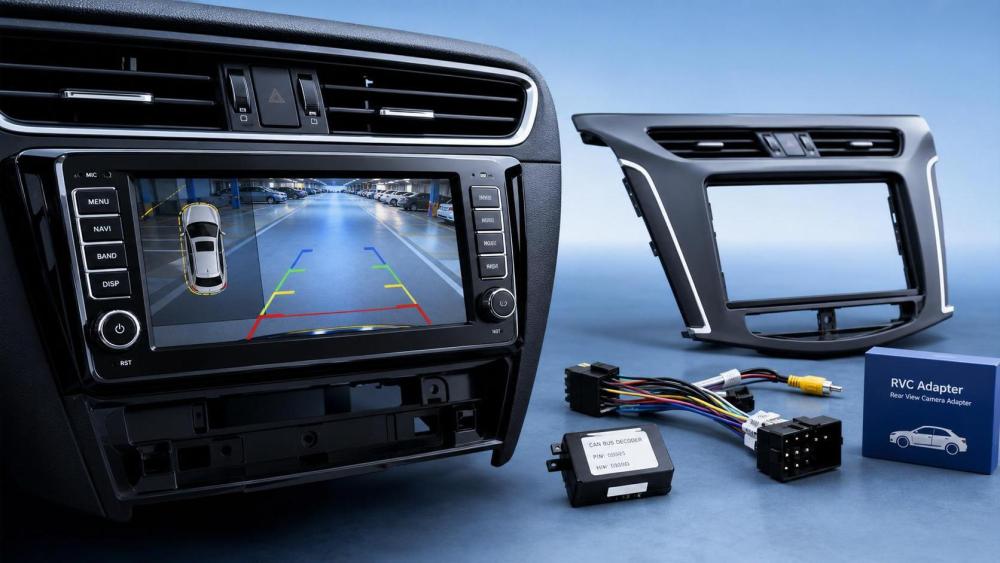
Choosing a touchscreen head unit sounds easy at first. The trouble usually starts when the unit does not match the vehicle.
A poor fit can affect wiring, sound quality, steering wheel controls, cameras, and smartphone functions. That quickly turns a simple upgrade into an expensive fix.
The good news is that most touchscreen head unit problems are predictable. With the right checks, you can avoid almost all compatibility issues before buying.
This guide breaks down what matters most, from dashboard size to factory audio support. It also helps you compare features based on real driving habits.
Start with Vehicle Fitment, Not Features
The first rule is simple: check fitment before looking at screen size, apps, or styling. A touchscreen head unit must physically fit the dashboard opening.
Most vehicles use either single-DIN, double-DIN, or custom factory shapes. Many newer cars have integrated panels that need a special fascia kit.
Do not assume a “universal” touchscreen head unit will drop into place. Universal usually means the chassis is standard, not the surrounding trim.
Before ordering, confirm these points:
- Vehicle make, model, year, and trim level
- Dashboard opening size
- Need for a dash kit or mounting bracket
- Climate control or factory screen integration
- Space behind the dash for wiring and connectors
This is where many buyers make their first mistake. They compare features first, then discover the touchscreen head unit cannot sit properly in the dashboard.
Check Wiring Harness Compatibility Early
Wiring compatibility matters just as much as dashboard fit. A touchscreen head unit may power on, yet still fail to work correctly with the vehicle.
Different cars use different harness designs, amplifier signals, and data communication systems. That means plug shape alone is not enough.
In practical terms, you should confirm whether the touchscreen head unit needs:
- A vehicle-specific wiring harness adapter
- A CAN bus interface
- An amplifier retention module
- A separate antenna adapter
- A camera retention or conversion cable
A factory amplified system is a common risk point. Some touchscreen head unit models work poorly without the correct interface module.
If the vehicle uses premium branded audio, verify support before purchase. Otherwise, sound may be weak, noisy, or missing from certain speakers.
Do Not Overlook Steering Wheel Controls and Factory Functions
A touchscreen head unit should not make the cabin less convenient. Retaining factory controls is often the difference between a smart upgrade and a daily annoyance.
Steering wheel buttons are especially important. Volume, track change, voice command, and call controls should keep working after installation.
Some vehicles also route warning sounds, parking sensors, climate display data, or vehicle settings through the factory media system.
That creates a more serious compatibility issue. Removing the original unit may affect functions that seem unrelated to audio playback.
Before choosing a touchscreen head unit, make a list of the factory features you want to keep. Then match them against the adapter kit and unit specifications.
Match the Touchscreen Head Unit to Your Phone and Apps
For many buyers, smartphone support is the main reason to upgrade. But not every touchscreen head unit handles phones in the same way.
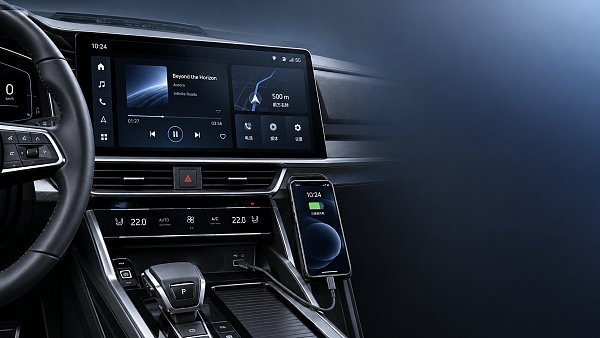
Check whether the unit supports wired or wireless Apple CarPlay and Android Auto. The difference matters more than it may seem.
Wireless use feels cleaner in daily driving, but wired connections are often more stable. That matters for navigation, calls, and music on long trips.
Also review Bluetooth version, microphone quality, USB port access, and charging output. A touchscreen head unit can support phone pairing yet still feel frustrating in use.
It helps to ask a few simple questions:
- Do you mainly use maps, calls, podcasts, or music?
- Is wireless phone connection worth the extra cost?
- Will more than one driver pair a phone regularly?
- Do you need fast charging through the head unit port?
A touchscreen head unit should support the way the car is actually used. A long feature list is less valuable than consistent everyday performance.
Pay Attention to Audio Hardware and Sound Tuning
Sound quality depends on more than speaker power. The touchscreen head unit plays a major role in signal quality, tuning control, and system expansion.
If audio matters, check preamp voltage, equalizer bands, crossover settings, and time alignment support. These features make a real difference.
A basic touchscreen head unit may be fine for casual listening. A more advanced system is better when adding amplifiers, subwoofers, or upgraded speakers.
Another useful check is audio source support. Look for clear information on USB formats, streaming codecs, and radio reception performance.
From a buying perspective, this prevents overspending on display features while ignoring the actual listening experience.
Screen Size, Interface Speed, and Daily Usability Matter More Than Specs Alone
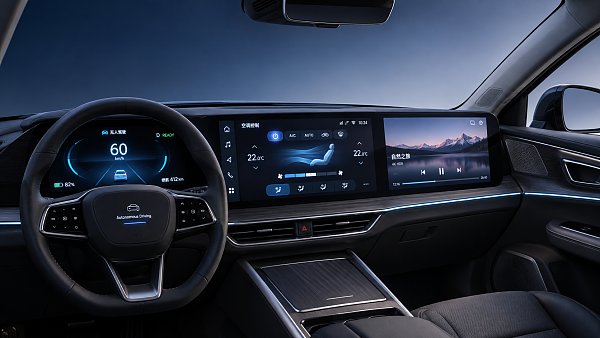
A larger display is not always the better choice. The best touchscreen head unit is easy to read, quick to respond, and simple to use while driving.
Look at brightness, anti-glare performance, touch sensitivity, menu layout, and boot speed. These details affect daily satisfaction more than raw resolution.
Physical knobs or shortcut buttons can still be valuable. They make volume changes and quick inputs easier without staring at the screen.
If possible, watch real demo videos or test a display in person. A touchscreen head unit can look impressive online and feel slow in real use.
More recent products also vary in software update quality. A polished interface often stays useful longer than a flashy but unstable system.
Use a Simple Compatibility Checklist Before You Buy
When comparing options, a short checklist keeps the decision grounded. It also reduces the chance of missing one costly detail.
- Confirm dashboard size and trim fit.
- Check harness, antenna, and CAN bus requirements.
- Verify steering wheel control retention.
- Confirm backup camera and parking sensor support.
- Match Apple CarPlay or Android Auto needs.
- Review audio output and tuning features.
- Check screen usability in daylight.
- Compare installation parts and total cost.
That last point is often overlooked. The touchscreen head unit may seem affordable until adapters, dash kits, modules, and labor are added.
A better buying decision comes from looking at total installed value, not just the sticker price.
Final Buying Advice
The best touchscreen head unit is not simply the biggest or the most expensive. It is the one that fits the vehicle, keeps key functions, and works smoothly every day.
A careful choice starts with compatibility, then moves to phone support, audio quality, and ease of use. That order prevents most upgrade mistakes.
Before placing an order, compare the touchscreen head unit with your exact vehicle details and your must-have functions. A ten-minute check can save hours of rework later.
When the fitment, wiring, and daily features all line up, a touchscreen head unit becomes one of the most worthwhile upgrades you can make in the cabin.
Have questions about this sector analysis, or seeking best practices specific to your niche? Drop us a line below and let the senior consultants at GAC assist you.
“We respect your privacy. Your information is strictly confidential.”
Related News
- 00
0000-00
Can a smart cockpit platform support multiple displays? - 00
0000-00
How is automotive connector vibration resistance tested? - 00
0000-00
How heat pumps save energy in automotive cabin climate systems - 00
0000-00
Is an EV heat pump worth it for winter driving range? - 00
0000-00
When should you use 50-ohm coaxial cable instead of 75-ohm?
Weekly Insights
Stay ahead with our curated technology reports delivered every Monday.
Recommended News
 Can a smart cockpit platform support multiple displays?Can a smart cockpit platform support multiple displays? Explore key requirements for performance, safety, connectivity, and supplier evaluation.Author:Time:Nov 07, 2026
 How is automotive connector vibration resistance tested?Automotive connector vibration resistance testing reveals hidden contact failures. Explore test profiles, continuity monitoring and pass criteria.Author:Time:Nov 06, 2026
 How heat pumps save energy in automotive cabin climate systemsAutomotive Cabin Climate Systems energy saving starts with smarter heat pump design. Explore real-world efficiency, cold-weather trade-offs, and testing tips.Author:Time:Nov 05, 2026
 Is an EV heat pump worth it for winter driving range?Is a heat pump worth using in a cold-climate EV? Discover how it affects winter range, when it pays off, and what to check before buying.Author:Time:Nov 04, 2026
 When should you use 50-ohm coaxial cable instead of 75-ohm?Coaxial cable 50 ohm or 75 ohm? Learn when to use each, avoid impedance mismatches, and choose the right cable for reliable RF and video performance.Author:Time:Nov 03, 2026
 How to select a high temperature motor harness for an EVChoose the right high temperature motor harness for your EV. Compare thermal limits, current capacity, shielding, routing, and validation evidence.Author:Time:Nov 02, 2026
 How much does electric power steering replacement cost?Electric power steering price typically ranges from $1,000 to $3,000 for major replacements. Discover cost factors, repair options, and tips for comparing quotes.Author:Time:Nov 01, 2026
 How to size an EV A/C compressor for the required cooling capacitySize an EV A/C Compressor with confidence. Explore cooling loads, performance maps and power limits to select the right compressor for your vehicle.Author:Time:Oct 31, 2026
 How to choose the right pitch for an FPC board connectorFPC board connector pitch affects space, assembly and reliability. Learn how to compare options and select the best fit for your design.Author:Time:Oct 30, 2026
 How zonal design affects harness routing in high-voltage EV architecturesExplore high-voltage electrical architecture zonal design and its impact on EV harness routing. Discover key trade-offs in cable length, safety, thermal performance, and service access.Author:Time:Oct 29, 2026
 How tariffs affect costs in global automotive parts supply chainsNavigate tariffs in the global automotive parts trade supply chain. Learn to compare landed costs, manage duty exposure, and uncover smarter sourcing strategies to protect your margins.Author:Time:Oct 28, 2026
 How to assess vendor lock-in in a software-defined vehicle platformAssess Software-Defined Vehicle platform lock-in with practical tests for API portability, data access, update control, and exit costs. Learn how to choose a platform with a proven exit path.Author:Time:Oct 27, 2026
 How ISO 26262 guides functional safety in steer-by-wire systemsExplore steering systems functional safety through ISO 26262. Learn how hazard analysis, fault-tolerant design, and validation build a stronger steer-by-wire safety case.Author:Time:Oct 26, 2026
 How to evaluate a steering angle sensor manufacturer's accuracy claimsEvaluate steering angle sensor manufacturer accuracy claims with practical checks on calibration, latency, and test evidence. Compare suppliers confidently and avoid costly selection mistakes.Author:Time:Oct 25, 2026
 How to diagnose CAN bus faults in a hybrid vehicle control unitDiagnose Hybrid Vehicle Systems control unit CAN bus faults with step-by-step power, wiring, and waveform checks. Find the root cause and avoid unnecessary replacement.Author:Time:Oct 24, 2026
 How does battery cooling pipe diameter affect coolant pressure drop?Battery Cooling Pipe diameter affects coolant pressure drop and pump power. Explore sizing calculations and practical tips to optimize EV battery cooling and compare options with confidence.Author:Time:Oct 23, 2026
 How to assess PPAP readiness of automotive sensor system manufacturersAssess Automotive Sensor Systems manufacturers for PPAP readiness. Learn to verify production evidence, measurement capability, validation, and traceability to reduce sourcing risks.Author:Time:Oct 22, 2026
 What to ask an FPC connector manufacturer about reliability testingChoosing an FPC Connector manufacturer? Learn what to ask about reliability testing, failure limits, and traceable results to reduce design risks and select with confidence.Author:Time:Oct 21, 2026
 How to verify vehicle fitment for an aftermarket AC evaporatorNavigating the evaporator aftermarket? Verify vehicle fitment with VIN data, OE numbers, and physical interface checks. Use this guide to avoid costly mismatches and order confidently.Author:Time:Oct 20, 2026
 How electric compressor speed affects EV battery cooling capacityElectric compressor technology: battery cooling depends on more than RPM. Discover how speed, refrigerant flow, and system limits affect EV cooling capacity and energy efficiency.Author:Time:Oct 19, 2026
 How to verify a variable frequency compressor supplier’s efficiency claimsVerify a variable frequency compressor supplier’s efficiency claims using COP boundaries, matched test conditions, and duty-cycle data. Learn how to choose with confidence.Author:Time:Oct 18, 2026
 How bend radius affects FPC reliability in automotive camera modulesAutomotive FPC applications: camera module reliability starts with bend radius. Learn how stack-up, strain, and validation guide robust designs and help prevent costly failures.Author:Time:Oct 17, 2026
 How to diagnose intermittent loss of electric power steering assistMaster power steering system diagnostics to trace intermittent EPS assist loss. Learn proven checks for voltage, wiring, and fault codes to avoid costly guesswork.Author:Time:Oct 16, 2026
 How to size automotive power modules for electric compressorsSize automotive power modules for electric compressors with confidence. Learn how voltage, phase current, losses, and cooling shape reliable selection—and avoid costly oversizing.Author:Time:Oct 15, 2026
 Why automotive power electronics are shifting to silicon carbideAutomotive Power Electronics are shifting to silicon carbide. Discover how SiC can cut losses, boost EV power density, and reshape cooling, reliability, and system costs.Author:Time:Oct 14, 2026
 How EV adoption shapes the electrically driven compressor marketExplore how EV adoption shapes the electrically driven compressor market, from battery cooling and heat pumps to supplier margins. Discover the drivers of profitable growth.Author:Time:Oct 13, 2026
 How to size a PTC heater for reliable EV cabin heatingPTC Heater sizing for EV cabins: learn how to balance defrost performance, heat-pump integration, airflow, voltage range, and battery power for reliable winter comfort.Author:Time:Oct 12, 2026
 What determines the cooling output of electric automotive AC compressors?Automotive air conditioning compressors electric systems: explore how speed, voltage, refrigerant, controls, and heat exchangers shape EV cooling capacity and efficiency.Author:Time:Oct 11, 2026
 What makes a touchscreen media head unit responsive enough for daily use?Touchscreen media head unit performance explained: discover what delivers fast starts, smooth maps, reliable phone pairing, and responsive daily driving.Author:Time:Oct 10, 2026
 How Does a Battery Management System Communicate Cooling Demand?How does a battery management system communicate cooling demand? Explore CAN signals, thermal priorities, fault handling, and EV cooling control strategies.Author:Time:Oct 20, 2026