How does a head-up display work in a high-performance car?




In a high-performance car, a head-up display helps drivers stay focused on the road while accessing critical real-time data.
But hoe werkt een head-up display in een high-performance auto en welke informatie toont het? It projects selected driving information into the driver’s forward view, reducing the need to look down.
What Is the Main Purpose of a Performance Car HUD?
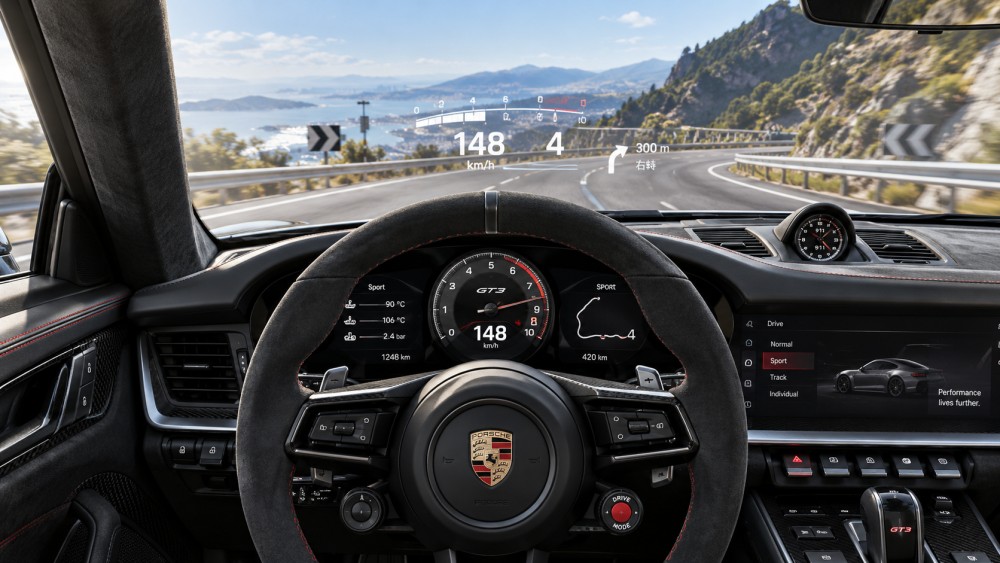
A head-up display, usually called a HUD, presents digital information visually near the windshield, where the driver can review it without fully shifting attention away from traffic.
For a performance-oriented vehicle, the primary benefit is not visual novelty. It is quicker access to useful information during acceleration, cornering, braking, overtaking, and navigation.
Drivers of high-performance cars often need to monitor speed more frequently than ordinary commuters, particularly when driving on highways, mountain roads, or track-day environments.
A well-designed HUD reduces repeated eye movements between the instrument cluster and the road. This can make the driving experience feel more natural and controlled.
It should not be confused with an entertainment display. Its role is to prioritize immediate, safety-relevant, and performance-relevant information in a carefully limited viewing area.
Modern systems can project onto the windshield itself or onto a small transparent combiner screen that rises from the dashboard when the vehicle starts.
Windshield-projected HUDs are generally more integrated and premium. Combiner HUDs can be less expensive, but may offer a smaller image and less refined appearance.
For consumers, the practical question is simple: does the display show the right information clearly, at the right time, without becoming visually distracting?
How Does a Head-Up Display Create an Image in Front of the Driver?
A HUD uses a compact display module, optical components, mirrors, and software to create a virtual image that appears ahead of the vehicle.
The source may be an LCD, LED, DLP, or laser-based projection unit. Each technology affects brightness, contrast, color accuracy, packaging, and production cost.
Inside the dashboard, the system generates an image and reflects it through shaped mirrors. Those mirrors enlarge and position the projected information accurately.
The windshield then acts as a reflective surface, allowing the driver to see graphics floating beyond the dashboard instead of looking at a conventional screen.
The image is called “virtual” because it does not physically exist in front of the vehicle. Optical design makes it appear farther away than the windshield.
This apparent distance matters because the driver’s eyes can move between road conditions and projected information with less focus adjustment than dashboard viewing requires.
In advanced systems, the virtual image can appear several meters ahead. This improves readability and creates a more natural visual relationship with the road.
Automotive engineers must carefully control image position, distortion, double reflections, brightness, and alignment for drivers of different heights and seating positions.
The windshield is often specially designed for HUD use. Its laminated layers and reflective properties help prevent ghost images that would reduce clarity.
Which Information Does a High-Performance Car HUD Usually Show?
The speedometer is normally the most important HUD element. It allows the driver to monitor vehicle speed while maintaining a forward road view.
Many performance vehicles also display the current speed limit, using camera recognition, map data, or a combination of both information sources.
Navigation prompts are another common feature. Instead of displaying a full map, the HUD may show arrows, lane guidance, distances, and upcoming turns.
In a sports car, the display can show engine speed, gear position, shift timing, and a shift-up indicator for more precise acceleration.
A shift light is particularly useful in manual, dual-clutch, and high-output automatic vehicles. It helps drivers recognize an optimal shift point without checking the tachometer.
Some systems provide performance measurements such as acceleration timers, lap times, G-force readings, power output, torque delivery, and launch-control status.
Track-focused HUD modes may include a simplified tachometer bar, selected gear, engine temperature warnings, tire pressure alerts, and brake-related status information.
Safety systems can also use the display for forward-collision alerts, pedestrian warnings, lane-departure notifications, blind-spot prompts, and adaptive cruise information.
The best displays avoid showing every available data point. A crowded projection can make essential information harder to recognize during demanding driving situations.
Why Is an Augmented Reality HUD Different?
An augmented reality HUD, often called an AR-HUD, goes beyond placing static data in front of the driver. It visually anchors information to the driving environment.
For example, a navigation arrow may appear to sit on the correct lane or road surface rather than simply floating in a fixed location.
This requires the vehicle to combine navigation data, cameras, sensors, vehicle position, and software that continually calculates where graphics should appear.
AR-HUD systems may highlight an upcoming turn, show a following-distance warning near another vehicle, or indicate a safer lane for a junction.
In high-performance applications, augmented displays can potentially support racing lines, braking references, corner warnings, or track-oriented guidance where regulations and design permit.
However, consumers should treat ambitious AR features with realistic expectations. Their usefulness depends heavily on sensor quality, map accuracy, weather, and display calibration.
A poorly calibrated system can place graphics in a confusing position. This is why vehicle manufacturers test HUD behavior across different road, light, and driver conditions.
AR-HUD technology is promising because it can make complex information more intuitive. Still, simple speed, shift, and navigation data often remain the most valuable daily features.
How Does the HUD Stay Visible in Bright Sunlight and at Night?
Visibility is one of the most important measures of HUD quality. A display that looks impressive in a showroom may perform poorly in direct sunlight.
High-performance automotive HUDs need sufficient brightness to remain readable during daytime driving without becoming harsh or dazzling after dark.
Ambient light sensors monitor external conditions and automatically adjust image brightness. The display usually dims at night to reduce eye strain and windshield reflections.
Contrast is equally important. Bright graphics need clear separation from the road, dashboard, sky, and surrounding traffic for fast recognition.
Polarized sunglasses can affect HUD visibility in some vehicles. Before buying, drivers who regularly wear polarized lenses should test the display personally.
The viewing angle also matters. A driver should see the complete projection after making normal seat, steering wheel, and mirror adjustments.
Many vehicles provide HUD height controls, brightness controls, and content settings. These adjustments help tailor the projection to the driver’s physical position and preference.
Rain, dirt, fog, frost, or windshield damage may reduce clarity. The HUD itself may work correctly while external windshield conditions limit useful visibility.
For this reason, HUD convenience never replaces proper windshield maintenance, correct seating position, or attentive driving behavior in difficult weather conditions.
Does a HUD Actually Make Driving Safer?
A head-up display can support safer driving by shortening the time spent looking away from the road. It does not automatically make every driver safer.
The safety benefit depends on display design, the type of information shown, and whether the driver treats the system as a support tool.
Useful warnings are brief, clear, and relevant. They should draw attention to a developing hazard without forcing the driver to interpret unnecessary visual detail.
Too many alerts can create distraction or alert fatigue. Drivers may begin ignoring repeated warnings if they feel excessive, inaccurate, or poorly timed.
High-performance cars can reach elevated speeds quickly, so the value of immediate speed, navigation, and collision information may be particularly meaningful in real-world driving.
Yet a HUD cannot see every hazard, guarantee available traction, or compensate for tailgating, fatigue, poor judgment, or excessive speed.
Drivers should continue scanning mirrors, checking instruments when needed, and observing road conditions. The display supplements situational awareness rather than replacing it.
When evaluating a vehicle, pay attention to whether safety warnings are visible but restrained. Clear prioritization is more useful than dramatic animations or dense graphics.
What Should Buyers Check Before Choosing a Car With a HUD?
First, sit in the driver’s seat and adjust it normally. Verify that the complete HUD image remains visible without awkward head movement or compromised seating.
Check whether the image is sharp, bright, and easy to read in daylight. A dealership test drive during sunny conditions can reveal practical weaknesses.
Ask which information can be customized. Some drivers want navigation prompts and safety alerts, while others want performance data, rev indicators, and gear selection.
Consider how the HUD works with the vehicle’s driving modes. Performance mode should ideally present relevant data without cluttering ordinary daily-driving information.
Review whether the windshield is a dedicated HUD windshield. Replacement glass may require the correct specification to preserve image quality and avoid double reflections.
Repair costs deserve attention, especially on vehicles with cameras, sensors, and advanced driver assistance systems linked to the display and windshield assembly.
Buyers should also check whether features are standard, optional, subscription-based, or available only within a costly technology package.
A premium HUD is worthwhile when it improves regular driving confidence and convenience. It is less valuable when its features are rarely used or difficult to interpret.
Is a Head-Up Display Worth It in a High-Performance Car?
For many drivers, a HUD is one of the more useful cockpit technologies in a high-performance car because it supports quick, low-distraction access to essential data.
Its strongest everyday value comes from speed, navigation, speed-limit information, and driver-assistance alerts. These features can make long-distance and urban driving less demanding.
Its strongest enthusiast value comes from gear position, shift indicators, engine speed, lap information, and performance-focused displays that support more engaged driving.
The answer to hoe werkt een head-up display in een high-performance auto en welke informatie toont het? is ultimately both technical and practical.
Technically, it uses projection optics and software to create a virtual image in the driver’s forward field of view. Practically, it delivers information when attention matters most.
Choose a system based on clarity, configurability, daylight performance, and meaningful content rather than visual effects alone. A focused HUD can genuinely improve the driving experience.
Have questions about this sector analysis, or seeking best practices specific to your niche? Drop us a line below and let the senior consultants at GAC assist you.
“We respect your privacy. Your information is strictly confidential.”
Related News
- 00
0000-00
Can a smart cockpit platform support multiple displays? - 00
0000-00
How is automotive connector vibration resistance tested? - 00
0000-00
How heat pumps save energy in automotive cabin climate systems - 00
0000-00
Is an EV heat pump worth it for winter driving range? - 00
0000-00
When should you use 50-ohm coaxial cable instead of 75-ohm?
Tags
Weekly Insights
Stay ahead with our curated technology reports delivered every Monday.
Recommended News
 Can a smart cockpit platform support multiple displays?Can a smart cockpit platform support multiple displays? Explore key requirements for performance, safety, connectivity, and supplier evaluation.Author:Time:Nov 07, 2026
 How is automotive connector vibration resistance tested?Automotive connector vibration resistance testing reveals hidden contact failures. Explore test profiles, continuity monitoring and pass criteria.Author:Time:Nov 06, 2026
 How heat pumps save energy in automotive cabin climate systemsAutomotive Cabin Climate Systems energy saving starts with smarter heat pump design. Explore real-world efficiency, cold-weather trade-offs, and testing tips.Author:Time:Nov 05, 2026
 Is an EV heat pump worth it for winter driving range?Is a heat pump worth using in a cold-climate EV? Discover how it affects winter range, when it pays off, and what to check before buying.Author:Time:Nov 04, 2026
 When should you use 50-ohm coaxial cable instead of 75-ohm?Coaxial cable 50 ohm or 75 ohm? Learn when to use each, avoid impedance mismatches, and choose the right cable for reliable RF and video performance.Author:Time:Nov 03, 2026
 How to select a high temperature motor harness for an EVChoose the right high temperature motor harness for your EV. Compare thermal limits, current capacity, shielding, routing, and validation evidence.Author:Time:Nov 02, 2026
 How much does electric power steering replacement cost?Electric power steering price typically ranges from $1,000 to $3,000 for major replacements. Discover cost factors, repair options, and tips for comparing quotes.Author:Time:Nov 01, 2026
 How to size an EV A/C compressor for the required cooling capacitySize an EV A/C Compressor with confidence. Explore cooling loads, performance maps and power limits to select the right compressor for your vehicle.Author:Time:Oct 31, 2026
 How to choose the right pitch for an FPC board connectorFPC board connector pitch affects space, assembly and reliability. Learn how to compare options and select the best fit for your design.Author:Time:Oct 30, 2026
 How zonal design affects harness routing in high-voltage EV architecturesExplore high-voltage electrical architecture zonal design and its impact on EV harness routing. Discover key trade-offs in cable length, safety, thermal performance, and service access.Author:Time:Oct 29, 2026
 How tariffs affect costs in global automotive parts supply chainsNavigate tariffs in the global automotive parts trade supply chain. Learn to compare landed costs, manage duty exposure, and uncover smarter sourcing strategies to protect your margins.Author:Time:Oct 28, 2026
 How to assess vendor lock-in in a software-defined vehicle platformAssess Software-Defined Vehicle platform lock-in with practical tests for API portability, data access, update control, and exit costs. Learn how to choose a platform with a proven exit path.Author:Time:Oct 27, 2026
 How ISO 26262 guides functional safety in steer-by-wire systemsExplore steering systems functional safety through ISO 26262. Learn how hazard analysis, fault-tolerant design, and validation build a stronger steer-by-wire safety case.Author:Time:Oct 26, 2026
 How to evaluate a steering angle sensor manufacturer's accuracy claimsEvaluate steering angle sensor manufacturer accuracy claims with practical checks on calibration, latency, and test evidence. Compare suppliers confidently and avoid costly selection mistakes.Author:Time:Oct 25, 2026
 How to diagnose CAN bus faults in a hybrid vehicle control unitDiagnose Hybrid Vehicle Systems control unit CAN bus faults with step-by-step power, wiring, and waveform checks. Find the root cause and avoid unnecessary replacement.Author:Time:Oct 24, 2026
 How does battery cooling pipe diameter affect coolant pressure drop?Battery Cooling Pipe diameter affects coolant pressure drop and pump power. Explore sizing calculations and practical tips to optimize EV battery cooling and compare options with confidence.Author:Time:Oct 23, 2026
 How to assess PPAP readiness of automotive sensor system manufacturersAssess Automotive Sensor Systems manufacturers for PPAP readiness. Learn to verify production evidence, measurement capability, validation, and traceability to reduce sourcing risks.Author:Time:Oct 22, 2026
 What to ask an FPC connector manufacturer about reliability testingChoosing an FPC Connector manufacturer? Learn what to ask about reliability testing, failure limits, and traceable results to reduce design risks and select with confidence.Author:Time:Oct 21, 2026
 How to verify vehicle fitment for an aftermarket AC evaporatorNavigating the evaporator aftermarket? Verify vehicle fitment with VIN data, OE numbers, and physical interface checks. Use this guide to avoid costly mismatches and order confidently.Author:Time:Oct 20, 2026
 How electric compressor speed affects EV battery cooling capacityElectric compressor technology: battery cooling depends on more than RPM. Discover how speed, refrigerant flow, and system limits affect EV cooling capacity and energy efficiency.Author:Time:Oct 19, 2026
 How to verify a variable frequency compressor supplier’s efficiency claimsVerify a variable frequency compressor supplier’s efficiency claims using COP boundaries, matched test conditions, and duty-cycle data. Learn how to choose with confidence.Author:Time:Oct 18, 2026
 How bend radius affects FPC reliability in automotive camera modulesAutomotive FPC applications: camera module reliability starts with bend radius. Learn how stack-up, strain, and validation guide robust designs and help prevent costly failures.Author:Time:Oct 17, 2026
 How to diagnose intermittent loss of electric power steering assistMaster power steering system diagnostics to trace intermittent EPS assist loss. Learn proven checks for voltage, wiring, and fault codes to avoid costly guesswork.Author:Time:Oct 16, 2026
 How to size automotive power modules for electric compressorsSize automotive power modules for electric compressors with confidence. Learn how voltage, phase current, losses, and cooling shape reliable selection—and avoid costly oversizing.Author:Time:Oct 15, 2026
 Why automotive power electronics are shifting to silicon carbideAutomotive Power Electronics are shifting to silicon carbide. Discover how SiC can cut losses, boost EV power density, and reshape cooling, reliability, and system costs.Author:Time:Oct 14, 2026
 How EV adoption shapes the electrically driven compressor marketExplore how EV adoption shapes the electrically driven compressor market, from battery cooling and heat pumps to supplier margins. Discover the drivers of profitable growth.Author:Time:Oct 13, 2026
 How to size a PTC heater for reliable EV cabin heatingPTC Heater sizing for EV cabins: learn how to balance defrost performance, heat-pump integration, airflow, voltage range, and battery power for reliable winter comfort.Author:Time:Oct 12, 2026
 What determines the cooling output of electric automotive AC compressors?Automotive air conditioning compressors electric systems: explore how speed, voltage, refrigerant, controls, and heat exchangers shape EV cooling capacity and efficiency.Author:Time:Oct 11, 2026
 What makes a touchscreen media head unit responsive enough for daily use?Touchscreen media head unit performance explained: discover what delivers fast starts, smooth maps, reliable phone pairing, and responsive daily driving.Author:Time:Oct 10, 2026
 How Does a Battery Management System Communicate Cooling Demand?How does a battery management system communicate cooling demand? Explore CAN signals, thermal priorities, fault handling, and EV cooling control strategies.Author:Time:Oct 20, 2026