Automotive Head Up Display vs Cluster Screens: What Matters in Daily Driving




In daily driving, the difference between an automotive head up display and a cluster screen is not just visual style. It affects how quickly information is understood, how often eyes leave the road, and how relaxed the driver feels in traffic.
That is why this topic matters far beyond premium car design. Across smart cockpit development, display strategy now connects safety, user experience, electronic architecture, and the wider shift toward intelligent mobility.
For platforms that track cockpit electronics, HUD systems, cockpit displays, wiring, and vehicle infotainment, the comparison is especially relevant. It shows how one interface choice can influence daily usability and component integration at the same time.
Why this comparison has become more important
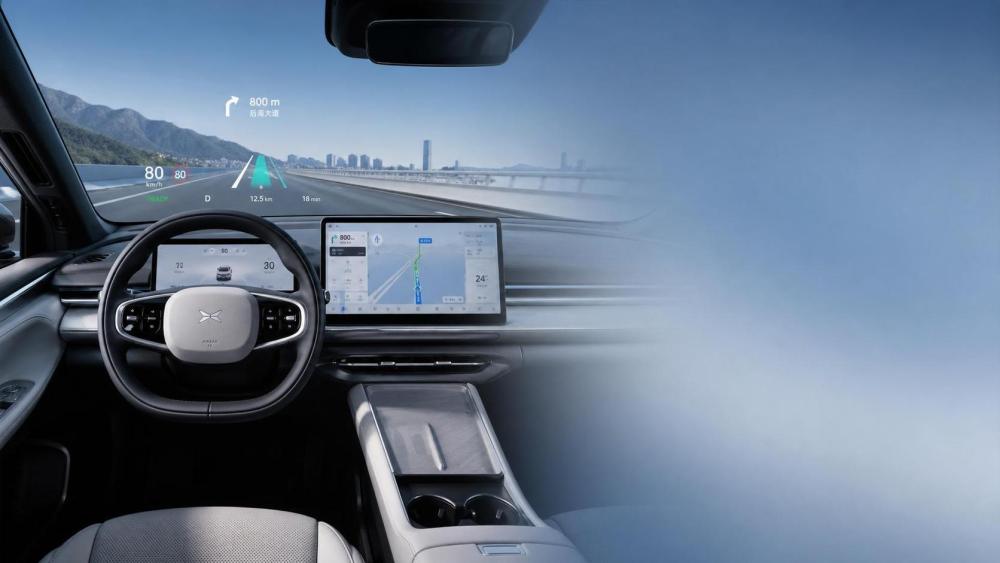
Vehicles now deliver more real-time information than before. Speed, navigation, battery range, driver assistance alerts, and media prompts compete for attention within a limited visual space.
Traditional cluster screens still carry the core driving data. They sit in a familiar position and remain the default reference point for most drivers.
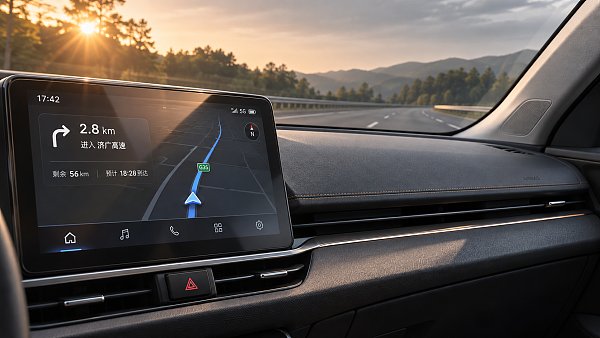
An automotive head up display changes that routine. Instead of forcing a downward glance, it projects key information closer to the forward line of sight.
This matters more in vehicles with advanced cockpit electronics. As cabins become more digital, the real challenge is not adding screens. It is deciding where information should appear and when.
From an industry perspective, that shift links directly with trends covered across GACT, including intelligent cabins, high-voltage electrical architecture, infotainment upgrades, and the broader evolution of automotive components.
What an automotive head up display actually changes
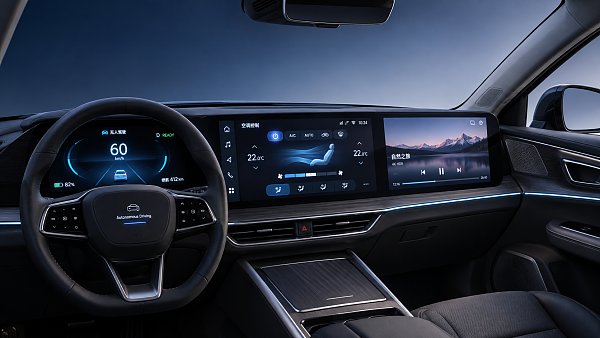
A cluster screen presents information in a dedicated panel behind the steering wheel. It is direct, established, and easy to package into almost any vehicle layout.
An automotive head up display adds another layer. It does not replace every screen. In most cases, it filters and elevates only the information needed at that moment.
That difference sounds simple, but it changes how people interact with the car. The best HUD systems reduce micro-distractions rather than adding visual novelty.
In practical terms, a useful automotive head up display often shows speed, turn-by-turn guidance, warning icons, and selected driver assistance signals. Less essential content stays on the cluster or center display.
When that balance is done well, the cockpit feels calmer. When it is done poorly, the display can feel busy, dim, misaligned, or distracting.
Daily driving is where the real difference appears
On paper, both systems deliver information. In daily use, they support different habits.
Urban traffic
In dense traffic, frequent speed checks and navigation prompts are common. An automotive head up display can reduce repeated downward glances during stop-and-go driving.
That benefit becomes more noticeable at busy intersections, lane merges, and unfamiliar roads. The cluster still matters, but the HUD can cut small interruptions in visual focus.
Highway cruising
At highway speed, even short eye movements matter more. Speed, lane guidance, and safety alerts shown in the forward view may feel easier to track over long distances.
Cluster screens remain effective here, especially when graphics are clear. Still, a well-tuned automotive head up display usually feels less tiring over time.
Night driving and poor weather
This is where quality matters most. A HUD that is too bright, too faint, or poorly focused can become annoying instead of helpful.
A cluster screen is often more predictable in these conditions. That is why display tuning, windshield compatibility, and brightness control are more important than the presence of HUD alone.
Where cluster screens still have clear advantages
A modern cluster screen should not be treated as outdated. In many vehicles, it remains the more complete and reliable source of information.
- It can show more detailed content without overloading the forward field of view.
- It is less sensitive to driver seating position and windshield projection quality.
- It often performs consistently across lighting conditions.
- It usually costs less to package than an advanced automotive head up display.
This is especially relevant in entry and mid-range models. For many drivers, a crisp cluster with sensible layout beats a flashy HUD with weak readability.
In other words, the choice is not old versus new. It is complete visibility versus immediate visibility, and each one serves a different purpose.
What to compare before deciding which matters more
A useful comparison should focus on daily experience rather than feature lists alone. The table below highlights the most practical decision points.
Usually, the most satisfying setup is not an either-or decision. It is a layered cockpit, where the automotive head up display handles priority information and the cluster screen supports deeper checks.
Why the industry is paying closer attention
HUD versus cluster is also a component story. It touches optics, display panels, wiring, software integration, communication architecture, and cockpit packaging.
That is why intelligent cockpit analysis increasingly sits beside discussions on harness weight, data transmission, media head units, and power management.
For electric and software-defined vehicles, display decisions also interact with efficiency and architecture. More sensors and assistance functions create more alerts, but not all alerts deserve equal visual priority.
This broader context is central to GACT’s coverage. HUD systems and cockpit displays are no longer isolated features. They are part of a connected automotive components ecosystem shaped by electrification and smart mobility.
How to judge real usability instead of showroom appeal
A bright demo screen can be persuasive, but daily value comes from consistency. A few checks make the comparison more practical.
- Check whether the automotive head up display stays readable with sunglasses and changing daylight.
- See if the displayed content is selective or cluttered with too many icons.
- Notice whether navigation instructions appear early enough to reduce sudden lane changes.
- Evaluate if the cluster screen remains legible during quick glances, not only when parked.
- Pay attention to seat position adjustment, because HUD alignment can vary by driver height.
If a display setup reduces effort without demanding attention, it is doing its job. If it keeps asking to be noticed, the design is likely working against daily comfort.
A practical way to think about the next step
The better question is not whether an automotive head up display is always superior. It is whether the display strategy matches the way the vehicle is actually used.
For frequent commuting, navigation-heavy driving, and long highway trips, HUD value tends to be easier to feel. For straightforward daily use, a strong cluster screen may already cover most needs.
When comparing models or following cockpit technology trends, focus on readability, information hierarchy, lighting performance, and integration quality. Those factors reveal more than screen size or visual novelty.
A clear framework helps: identify the information used most often, note when attention shifts away from the road, and compare how each interface handles those moments. That approach turns a design preference into a practical decision.
Have questions about this sector analysis, or seeking best practices specific to your niche? Drop us a line below and let the senior consultants at GAC assist you.
“We respect your privacy. Your information is strictly confidential.”
Related News
- 00
0000-00
How to assess a smart cockpit electronics manufacturer's integration capability - 00
0000-00
How does a shielded HSD cable reduce interference in vehicles? - 00
0000-00
What drives demand for scroll compressors in the automotive market? - 00
0000-00
Does AEC-Q200 apply to flexible printed circuits? - 00
0000-00
How does production volume affect automotive flexible electronics costs?
Weekly Insights
Stay ahead with our curated technology reports delivered every Monday.
Recommended News
 How to assess a smart cockpit electronics manufacturer's integration capabilityAssess a smart cockpit electronics manufacturer's integration capability with practical checks for interfaces, testing, safety, cybersecurity and supplier support.Author:Time:Nov 18, 2026
 How does a shielded HSD cable reduce interference in vehicles?Discover how a shielded HSD cable reduces vehicle interference, and learn why connector design, routing, and testing matter for reliable high-speed data links.Author:Time:Nov 17, 2026
 What drives demand for scroll compressors in the automotive market?Explore the scroll compressor for automobile market and discover how EV adoption, heat pumps, efficiency, and supplier capabilities shape demand.Author:Time:Nov 16, 2026
 Does AEC-Q200 apply to flexible printed circuits?Flexible Printed Circuit AEC-Q200 requirements explained: discover which components qualify and how to assess automotive FPC reliability.Author:Time:Nov 15, 2026
 How does production volume affect automotive flexible electronics costs?Explore how production volume affects automotive flexible electronics cost, from tooling and yield to testing. Compare quotes and negotiate smarter.Author:Time:Nov 14, 2026
 How much does an in-vehicle infotainment system cost to replace?Explore in-vehicle infotainment cost, from affordable repairs to factory replacements. Compare options, installation fees, and compatibility before you buy.Author:Time:Nov 13, 2026
 How does condenser efficiency affect heat pump performance?Discover how condenser high efficiency can improve heat pump performance, reduce compressor power, and boost heating COP—plus the trade-offs to watch.Author:Time:Nov 12, 2026
 What does each FAKRA cable color code mean?FAKRA cable color code explained: Explore common connector colors, typical uses and key compatibility checks before choosing a replacement.Author:Time:Nov 11, 2026
 How to compare noise ratings for battery coolant pumpsCompare coolant pump low noise ratings with confidence. Learn how test conditions, hydraulic duty, tonal noise and installation affect your choice.Author:Time:Nov 10, 2026
 How bright should automotive display systems be in sunlight?Automotive Display Systems need more than brightness to stay readable in sunlight. Discover why 1,000 nits is a starting point and how to evaluate glare and heat.Author:Time:Nov 09, 2026
 How heat pumps improve the efficiency of EV thermal systemsEV Thermal Systems use heat pumps to reduce heating energy demand. Explore how they work, where they excel, and what limits efficiency in cold weather.Author:Time:Nov 08, 2026
 Can a smart cockpit platform support multiple displays?Can a smart cockpit platform support multiple displays? Explore key requirements for performance, safety, connectivity, and supplier evaluation.Author:Time:Nov 07, 2026
 How is automotive connector vibration resistance tested?Automotive connector vibration resistance testing reveals hidden contact failures. Explore test profiles, continuity monitoring and pass criteria.Author:Time:Nov 06, 2026
 How heat pumps save energy in automotive cabin climate systemsAutomotive Cabin Climate Systems energy saving starts with smarter heat pump design. Explore real-world efficiency, cold-weather trade-offs, and testing tips.Author:Time:Nov 05, 2026
 Is an EV heat pump worth it for winter driving range?Is a heat pump worth using in a cold-climate EV? Discover how it affects winter range, when it pays off, and what to check before buying.Author:Time:Nov 04, 2026
 When should you use 50-ohm coaxial cable instead of 75-ohm?Coaxial cable 50 ohm or 75 ohm? Learn when to use each, avoid impedance mismatches, and choose the right cable for reliable RF and video performance.Author:Time:Nov 03, 2026
 How to select a high temperature motor harness for an EVChoose the right high temperature motor harness for your EV. Compare thermal limits, current capacity, shielding, routing, and validation evidence.Author:Time:Nov 02, 2026
 How much does electric power steering replacement cost?Electric power steering price typically ranges from $1,000 to $3,000 for major replacements. Discover cost factors, repair options, and tips for comparing quotes.Author:Time:Nov 01, 2026
 How to size an EV A/C compressor for the required cooling capacitySize an EV A/C Compressor with confidence. Explore cooling loads, performance maps and power limits to select the right compressor for your vehicle.Author:Time:Oct 31, 2026
 How to choose the right pitch for an FPC board connectorFPC board connector pitch affects space, assembly and reliability. Learn how to compare options and select the best fit for your design.Author:Time:Oct 30, 2026
 How zonal design affects harness routing in high-voltage EV architecturesExplore high-voltage electrical architecture zonal design and its impact on EV harness routing. Discover key trade-offs in cable length, safety, thermal performance, and service access.Author:Time:Oct 29, 2026
 How tariffs affect costs in global automotive parts supply chainsNavigate tariffs in the global automotive parts trade supply chain. Learn to compare landed costs, manage duty exposure, and uncover smarter sourcing strategies to protect your margins.Author:Time:Oct 28, 2026
 How to assess vendor lock-in in a software-defined vehicle platformAssess Software-Defined Vehicle platform lock-in with practical tests for API portability, data access, update control, and exit costs. Learn how to choose a platform with a proven exit path.Author:Time:Oct 27, 2026
 How ISO 26262 guides functional safety in steer-by-wire systemsExplore steering systems functional safety through ISO 26262. Learn how hazard analysis, fault-tolerant design, and validation build a stronger steer-by-wire safety case.Author:Time:Oct 26, 2026
 How to evaluate a steering angle sensor manufacturer's accuracy claimsEvaluate steering angle sensor manufacturer accuracy claims with practical checks on calibration, latency, and test evidence. Compare suppliers confidently and avoid costly selection mistakes.Author:Time:Oct 25, 2026
 How to diagnose CAN bus faults in a hybrid vehicle control unitDiagnose Hybrid Vehicle Systems control unit CAN bus faults with step-by-step power, wiring, and waveform checks. Find the root cause and avoid unnecessary replacement.Author:Time:Oct 24, 2026
 How does battery cooling pipe diameter affect coolant pressure drop?Battery Cooling Pipe diameter affects coolant pressure drop and pump power. Explore sizing calculations and practical tips to optimize EV battery cooling and compare options with confidence.Author:Time:Oct 23, 2026
 How to assess PPAP readiness of automotive sensor system manufacturersAssess Automotive Sensor Systems manufacturers for PPAP readiness. Learn to verify production evidence, measurement capability, validation, and traceability to reduce sourcing risks.Author:Time:Oct 22, 2026
 What to ask an FPC connector manufacturer about reliability testingChoosing an FPC Connector manufacturer? Learn what to ask about reliability testing, failure limits, and traceable results to reduce design risks and select with confidence.Author:Time:Oct 21, 2026
 How to verify vehicle fitment for an aftermarket AC evaporatorNavigating the evaporator aftermarket? Verify vehicle fitment with VIN data, OE numbers, and physical interface checks. Use this guide to avoid costly mismatches and order confidently.Author:Time:Oct 20, 2026